Cynoia team
Projects Overview
Written by : Cynoia team
Projects are where work happens in Cynoia.
They help teams organize tasks, track progress, and collaborate around shared goals.
A project can represent:
A product or feature
A client or campaign
An internal initiative
Any body of work your team needs to manage
What You Can Do with Projects
Inside a project, you can:
Create and assign tasks
Track progress using different views
Organize work with statuses, labels, and priorities
Plan timelines with sprints and Gantt charts
Automate actions and notifications
Monitor progress, workload, and budget
Track time spent on each task
Projects are flexible and adapt to how your team works.
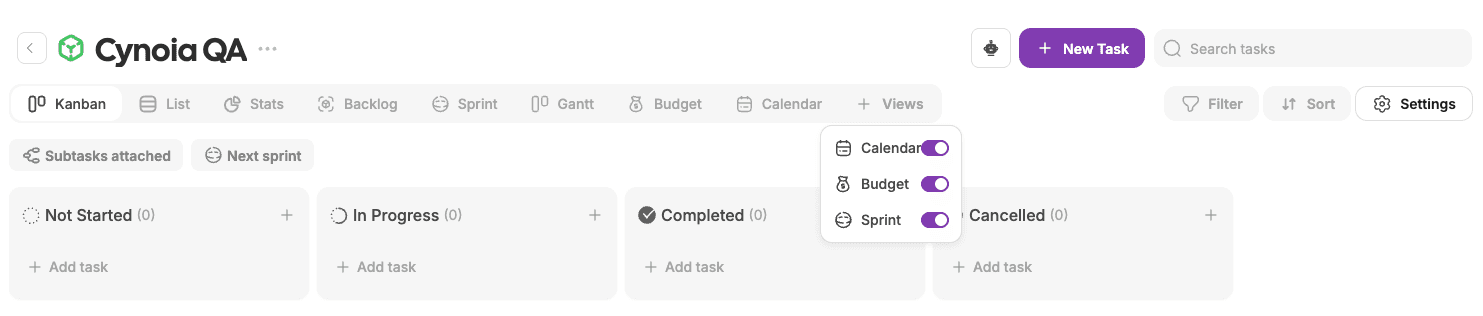
Project Views at a Glance
Each project supports multiple views to visualize work:
Kanban – Visual workflow using columns
List – Structured task list
Calendar – Tasks by date
Gantt – Timeline and dependencies
Sprint – Time-boxed iterations
Backlog – Planned but unassigned work
Stats – Project insights and progress
Budget – Cost tracking (if enabled)
Who Can Create Projects?
Everyone can create and manage their projects
Access may vary based on workspace and project settings.
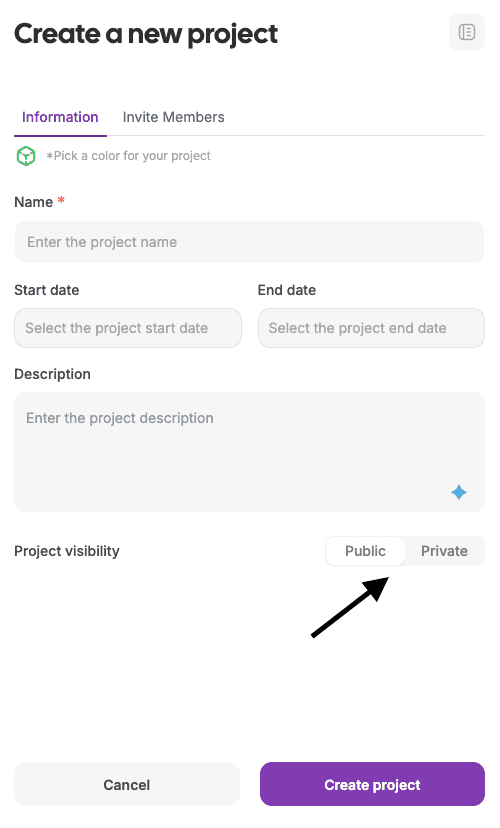
Public vs Private Projects
Projects can be public or private.
Public projects
Visible to all workspace members
Members join using their global role permissions
Private projects
Only accessible by invitation
Project creator or moderator assigns permissions per member
How Projects Fit in Your Workspace
Projects live inside a workspace and connect with other apps:
Tasks appear in Calendar
Files are accessible in Files
Activity generates Notifications
Automations keep teams aligned
Chat discussions support collaboration
This keeps everything connected in one place.
You’re Ready to Create Your First Project
Now that you understand what projects are and how they work, let’s create one.
👉 Next article: Creating Your First Project