Cynoia team
Notes & Knowledge Base
Written by : Cynoia team
Cynoia Notes is your team’s central knowledge base a flexible space to document ideas, specs, meeting notes, processes, and shared knowledge, all in one place.
Notes are designed to be:
✍️ Easy to write and structure
🤝 Simple to share and collaborate on
🗂️ Organized through folders and collections
🔐 Secure with granular access control
Whether you’re writing personal notes, team documentation, or public references, Notes adapt to your workflow.
Notes at a Glance
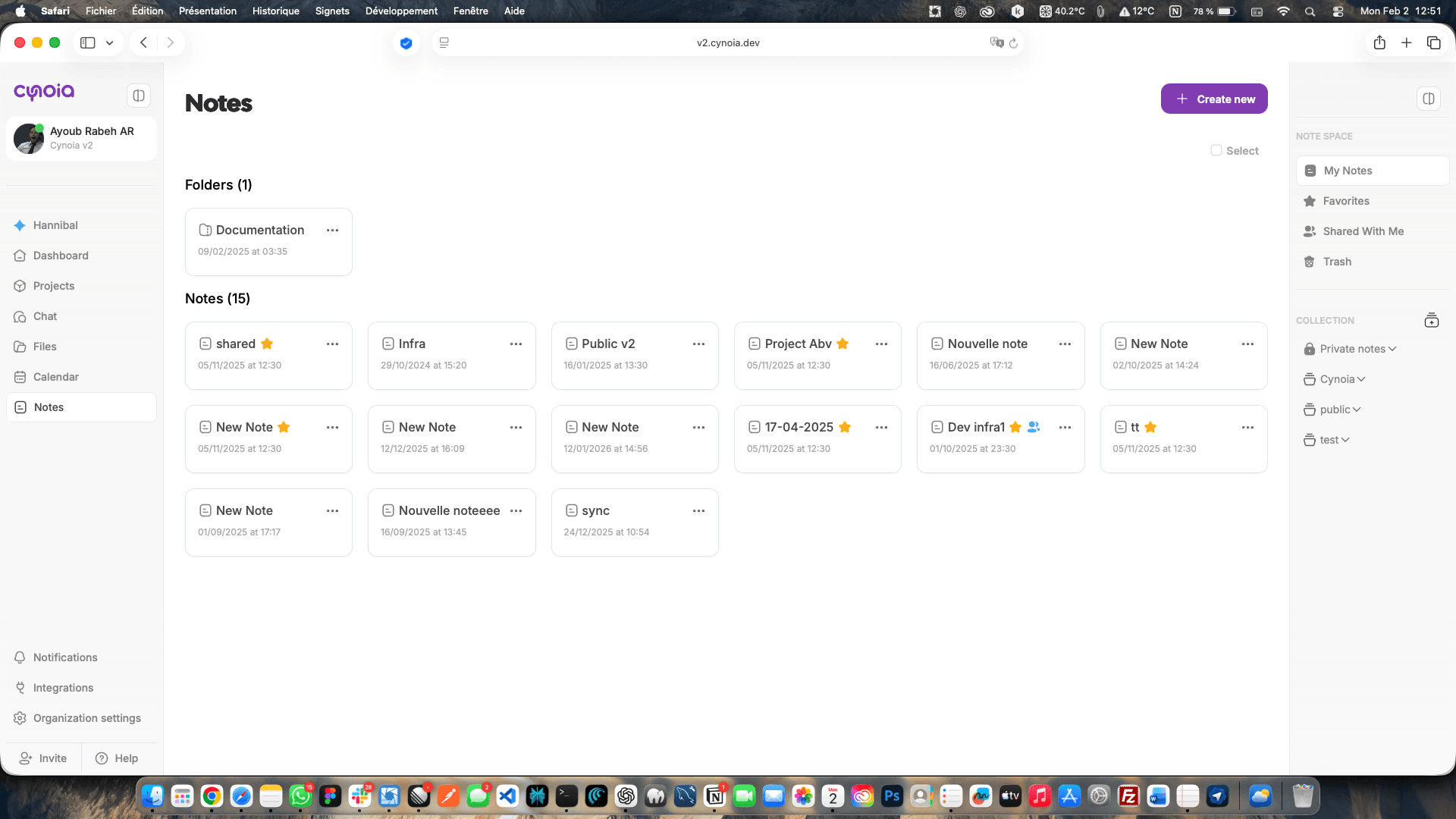
The Notes section is divided into three main layers:
Notes – individual documents
Folders – basic organization
Collections – structured spaces with visibility & permissions
From the Notes dashboard, you can quickly:
Create new notes
Browse folders
Switch between collections
Access shared or favorite notes
Notes vs Collections (Important Concept)
Understanding the difference between Notes and Collections is key.
📝 Notes
Individual documents
Rich-text editor with formatting blocks
Can be private or shared
Can be moved between folders or collections
🗂️ Collections
Containers for notes (like knowledge spaces)
Can be Private or Public
Have members and permissions
Ideal for teams, projects, or departments
Examples:
Private notes → personal thoughts, drafts
Public collection → company wiki, onboarding docs
Project collection → specs, decisions, documentation
Creating & Organizing Notes
You can create notes in multiple ways:
Click Create new from the Notes page
Create a note directly inside a collection
Create notes inside folders for quick grouping
Once created, notes can be:
Renamed
Moved to another folder or collection
Added to favorites ⭐
Shared with specific people
Powerful Rich-Text Editor
Cynoia’s editor is built for structured documentation.
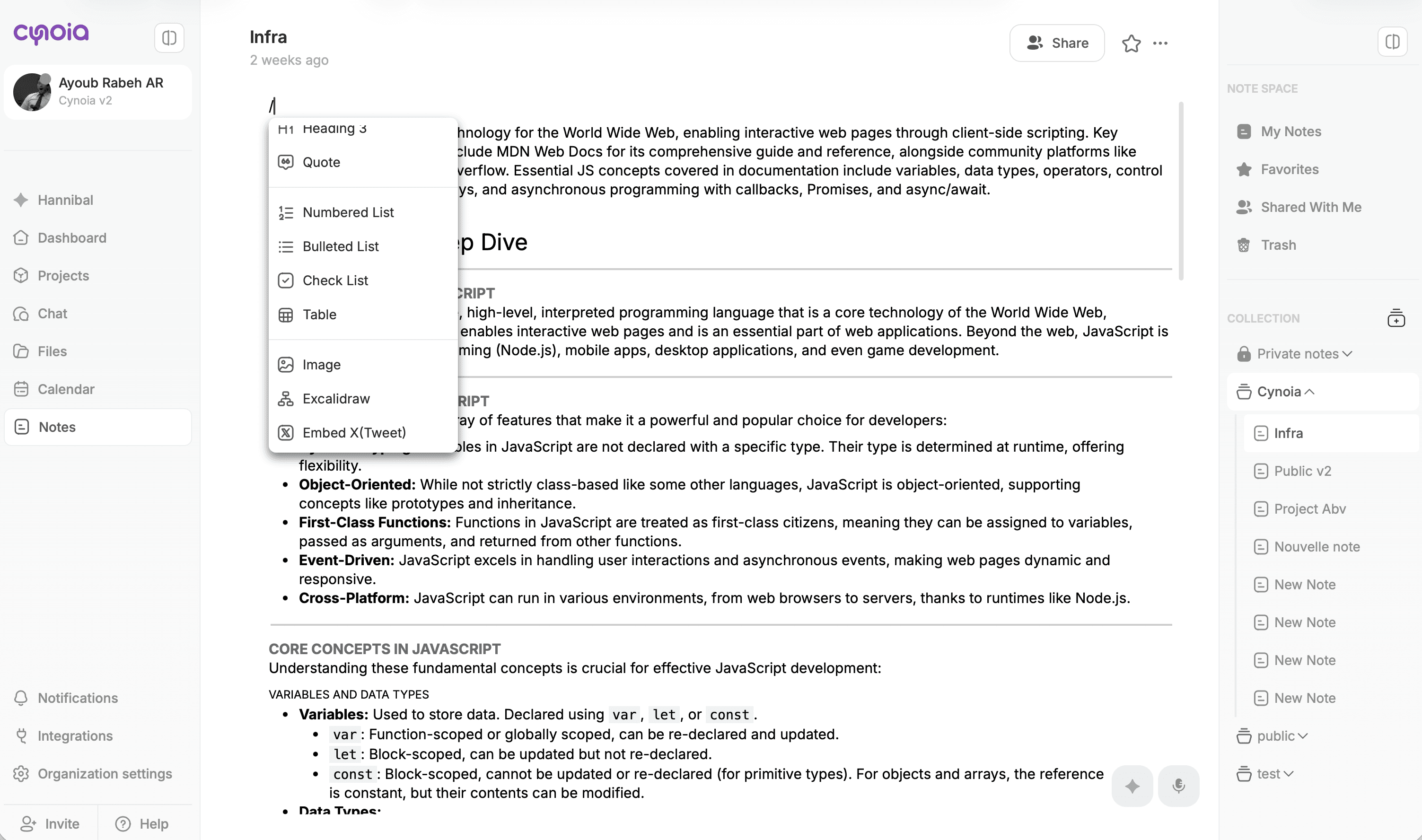
Available content blocks include:
Headings (H1, H2, H3)
Paragraphs
Bullet & numbered lists
Checklists
Quotes
Tables
Image
Excalidraw
Embed X ( Tweet )
Embed Youtube
Embed Figma document
Divider
Code
Columns Layout
Collapsible
Page Break
This makes it easy to write:
Technical documentation
Meeting notes
Guides & playbooks
Knowledge articles
Sharing & Collaboration
Notes are collaborative by design.
You can:
Share individual notes
Invite members to collections
Assign roles (Viewer / Editor)
Control who can edit vs read
Important behavior:
Permissions are contextual
A user may be an Editor globally but only a Viewer in a specific collection.
This ensures:
Sensitive content stays protected
Public knowledge remains accessible
Teams collaborate safely
Favorites, Shared & Trash
To help you stay organized, Notes include system views:
⭐ Favorites – quick access to important notes
🤝 Shared with me – notes others shared with you
🗑️ Trash – recover deleted notes if needed
These views make large knowledge bases easy to navigate.
When to Use Notes
Use Notes when you want to:
Build a company knowledge base
Document processes and decisions
Centralize project documentation
Share long-form content with your team
Keep personal or team notes in one place
What’s Next?
Now that you understand how Notes and the Knowledge Base work, we’ll dive deeper into:
👉 Creating & Editing Notes
Related to Notes & Knowledge Base